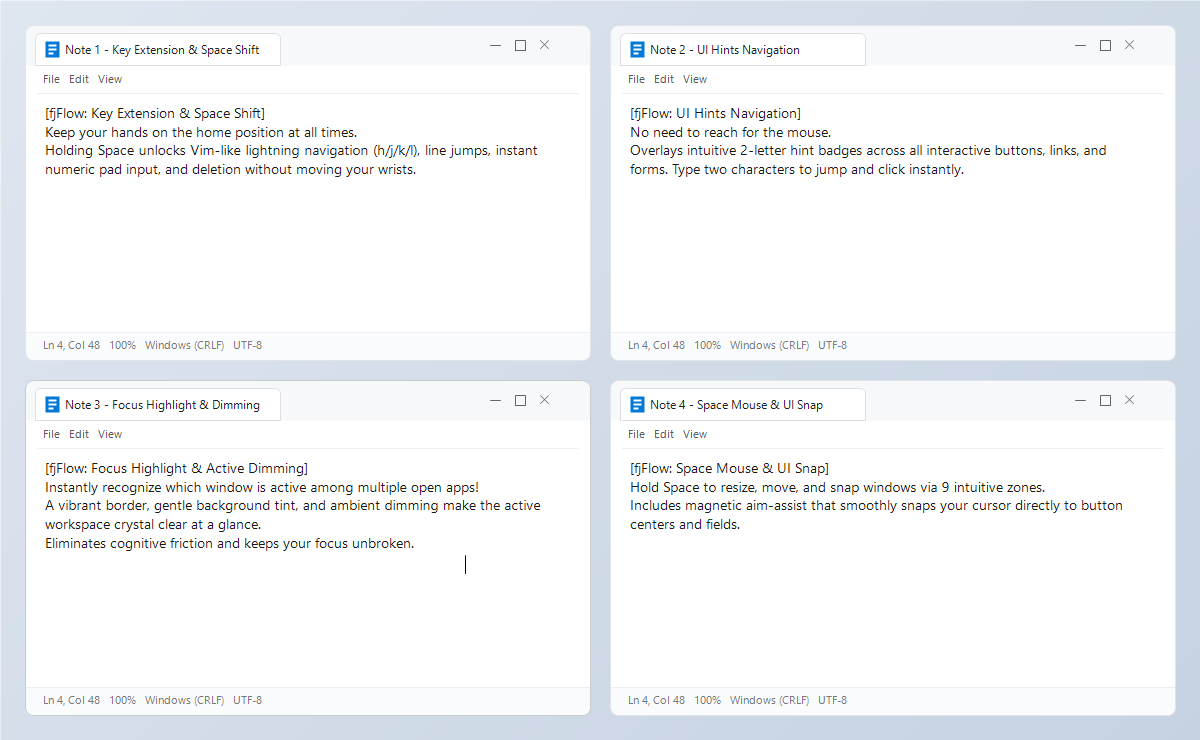
Windows Desktop Typing & Input Utility

Bring the PC to You.
Everything at Your Caret & Hands.

Caret-anchored CapsLock & status visualization and Space Shift home-row navigation.
Reduces eye travel and hand reaches so you can stay in unbroken Flow.

✓ 100% Offline (Zero Telemetry)✓ No Keylogging & Local-Only✓ Free & Pro Editions Available
fjFlow Desktop Preview
Windows 10 / 11 Supported
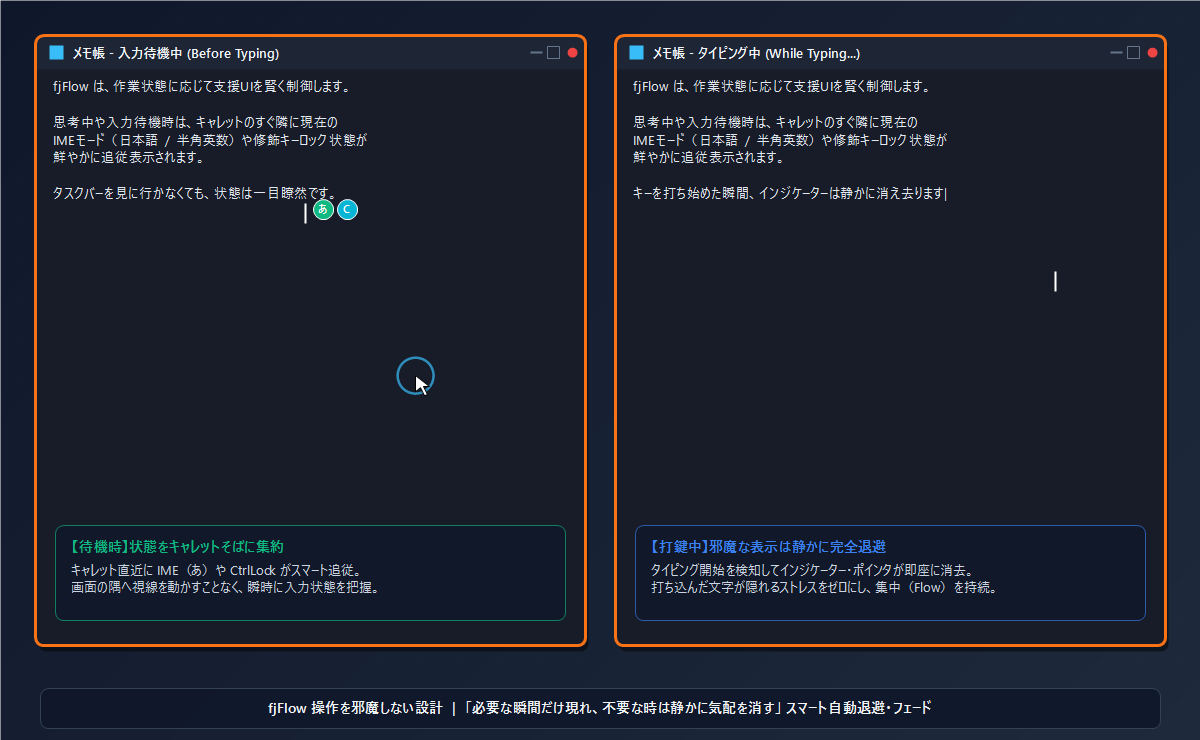
Desktop Recording: CapsLock indicator alerts you right at the caret and auto-hides while typing.
Design Philosophy

3 Structural Stressors of Modern PC Typing

Why does typing feel exhausting? The friction is not human error—it is an inherited flaw in PC design.

01
👁️

Scattered Visuals (Looking Away)

Glancing down at the far corner of your taskbar just to check your input mode breaks cognitive flow. With multiple windows open, guessing which window has focus leads to frustrating mistypes.

Traditional PC (Before)Scattered Focus Before
fjFlow (After)Caret Focused After
fjFlow's Answer

Caret-First: State is anchored right next to your caret, reducing eye movement to the taskbar.

02
✋

Hand Travel (Leaving Home Row)

Reaching for arrow keys, Enter, and Backspace breaks your typing posture dozens of times a minute. Constantly twisting your pinky to hold Shift or Ctrl adds physical strain to wrists and fingers.

Space Shift Home Row Navigation
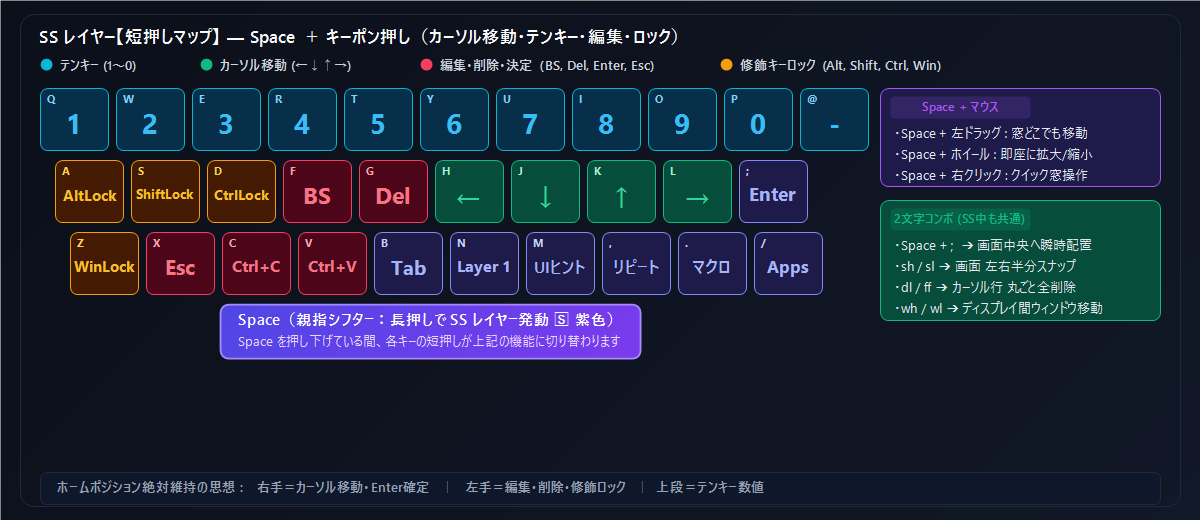
Thumb Space acts as a modifier, bringing arrows and edits to the home row
fjFlow's Answer

Keyboard-First: Thumb Space unlocks Layer 2, placing navigation keys at your fingertips.

03
🔕

Visual Noise (Distractions)

Intrusive assistant balloons and bouncing tooltips cover the very text you are writing. When you need deep concentration, unnecessary animations create friction.

Smart UI Auto Fade
Fades immediately upon typing, restoring calm with gentle breathing animation
fjFlow's Answer

Smart UI: Fades the moment you type. Quiet design that stays out of your way.

"Bring the PC to you, not you to the PC.
Caret position, input state, and editing controls—all centered right where your focus lives."
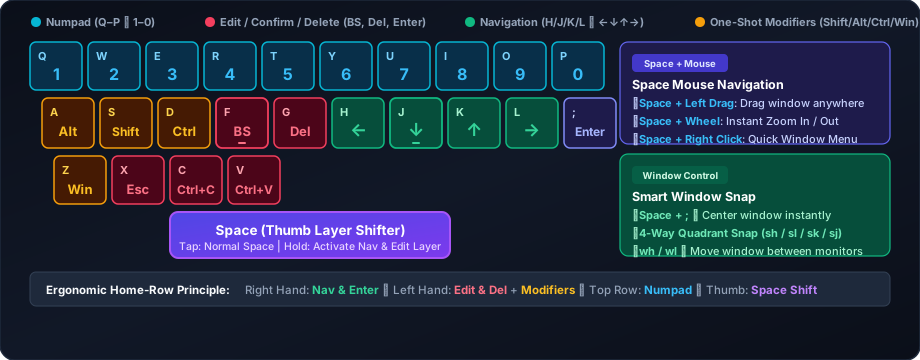
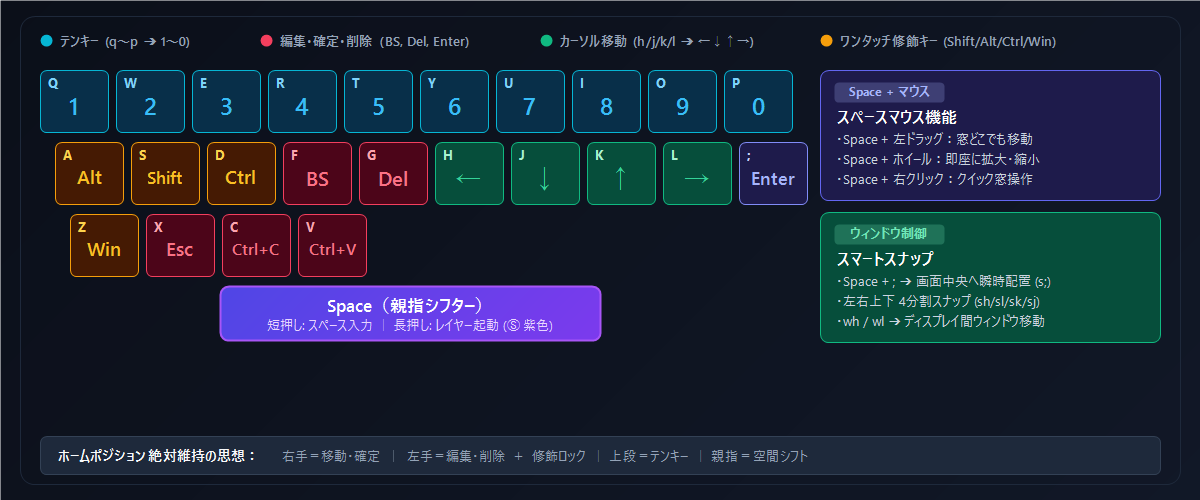
Layer Reference

4-Layer Key Extension Map (L0 / SS / L1 / L2)

fjFlow Space Shift Home Row Keymap Diagram
Core Overview

4 Core Pillars of the fjFlow System

An overview of how fjFlow groups caret awareness, home-row editing, mouseless control, and customization.

01
Home Row

Keep Your Hands on the Home Row

Reduce reaches to distant keys and streamline repetitive text edits.

  • Directional & Edit Layer: Move the cursor and trigger Enter, Backspace, or Delete from the home row
  • Repeat & Instant Macro: Replay your last typed phrase or record multi-step edits on the fly
  • One-Shot Modifier Locks: Hold Shift, Ctrl, Alt, or Win states with a single tap to reduce pinky strain
  • Reliable Key Logic: State-machine key handling designed for responsive, predictable typing
Explore Key Extension Manual →
02
Visual Focus

Keep Important Information in View

Keep your input state and editing position in view across supported applications.

  • Caret Indicator: Displays your active IME mode or CapsLock badge right next to the text caret
  • Caret Tracking Engine: Uses Windows accessibility APIs (UIA / MSAA / IA2) in supported apps, with a pixel-difference fallback (Pixel Caret Engine) for canvas and remote windows
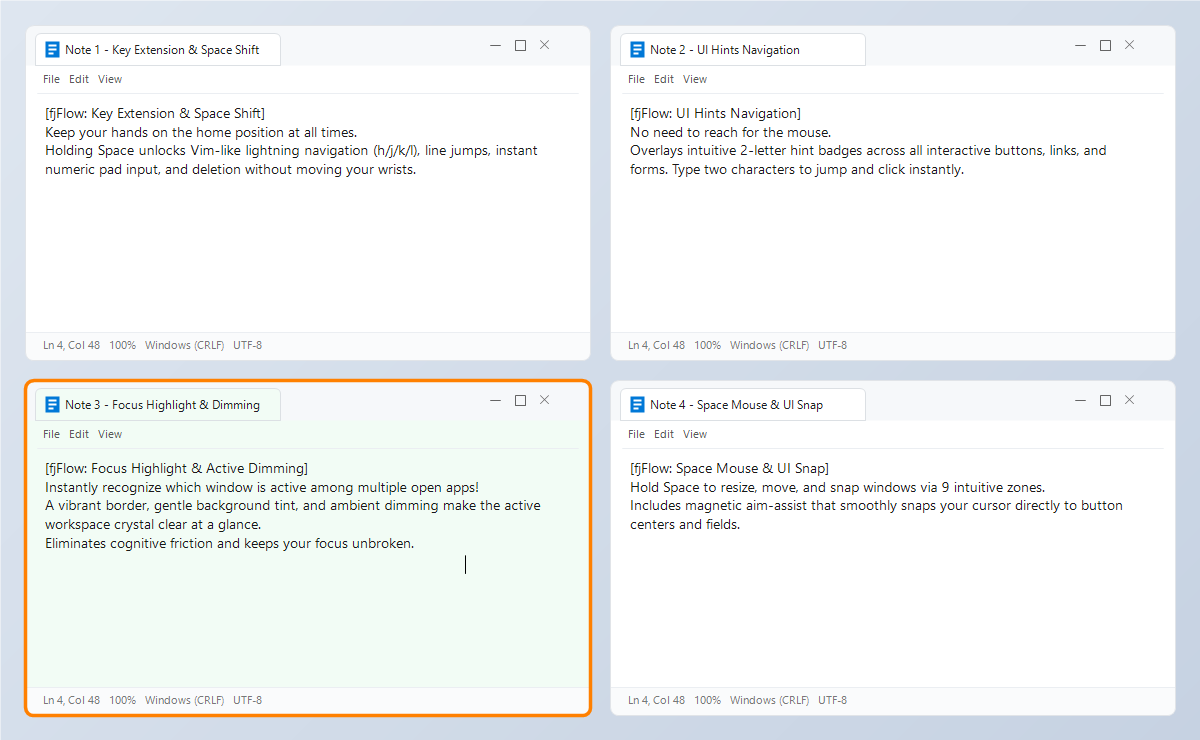
  • Focus Highlight & Dim: Highlights the active window border and dims background windows
  • Line Highlight & Zoom: Emphasizes the current editing line and magnifies small symbols at the screen corner
Explore Caret Indicator Docs →
03
Keyboard Control

Control More with the Keyboard

Click on-screen controls and draft multi-line text without switching to the mouse.

  • UI Hint Navigation: Overlays two-letter labels on screen controls so you can trigger clicks by typing
  • QuickDraft Separation: Opens a dedicated scratchpad to compose multi-line text before pasting into chat or cells
  • Zoom Grid & Click History: Magnifies dense toolbars for precise selection and jumps back to previous click spots
  • Space Mouse & UI Snap: Grab, move, and snap windows from anywhere inside the window frame
Explore UI Hint Manual →
04
Customization

Make It Your Own

Tailor visual balance and active key layers to match your environment and familiarity.

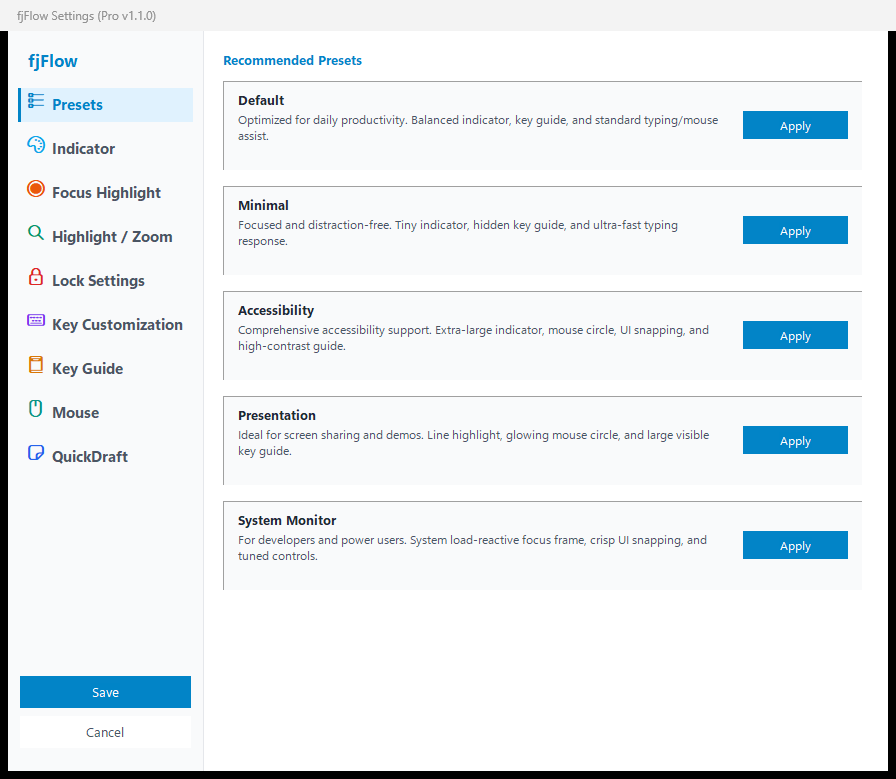
  • 5 Display Presets: One-click switch between Default, Minimal, Accessibility, Presentation, and System Monitor
  • 3 Key Extension Presets: Start with Basic navigation and progressively unlock Advanced and Full mappings
  • On-Screen HUD: Hold Space to view active key assignments on a translucent overlay
  • Portable Local JSON: Saves settings in a local JSON file without modifying the Windows Registry
Explore Presets & Settings Guide →
How It Works

Hands-On: Try Daily Operations in Your Browser

See the concrete shortcuts below and test how they behave in the interactive playground.

Operation 1Space + H / J / K / LMove cursor in 4 directions on the home row; Space + F for Backspace, Space + , to repeat.
Operation 2Caret IME & Auto-FadeCheck input mode right beside your caret; badge fades while typing and restores when idle.
Operation 3Space + m / Space + d (×2)Overlay 2-letter UI hints to click buttons, or double-tap d to draft multi-line notes safely.
Interactive PlaygroundTest fjFlow's 4 Core Experiences in Your Browser
*In-browser simulation. On Windows, fjFlow provides responsive, low-latency operation across supported desktop applications.
Click here and type on your keyboard. The indicator auto-fades while you type and gently restores when idle.
あ
Test typing auto-fade, shape switching, and color customization
●Ready: Switch between the 4 tabs above to experience fjFlow's workflow in your browser.
Use Cases

Tailored for High-Focus Workflows

From prose and programming to spreadsheets and multi-monitor workstations.

📝

Writing & Editing

Long-form writing & proofreading

Line Highlight (F8) dims peripheral lines to prevent line skipping. Caret indicator prevents unexpected input modes from breaking your prose rhythm.

💻

Coding

Editor & terminal switching

Space Shift Keymap

Prevents IME mistypes in terminals. Combine Space Shift hjkl navigation with Repeat Key (Space+,) and Instant Macro (Space+.) for rapid refactoring.

📊

Office Work

Spreadsheets, documents & chat

💡 Draft in QuickDraft? [Space] Launch
QuickDraft (Double-tap)Volatile RAM
1. Compose multi-line notes freely with Enter
2. Press Ctrl + Enter to paste into cell

Eliminates premature chat sends and accidental Enter commits in Excel cells. Compose multi-line text safely in QuickDraft before transferring.

🖥️

Keyboard Navigation

Multi-monitor desktop control

Click any button with 2-letter UI hints and move heavy windows effortlessly via Space+drag. Reduces mouse reaches across large displays.

Customization

Configure Comfortably with a Modern GUI

No need to manually edit raw config files. Fine-tune your experience through an intuitive, clean interface.

🚀

Ready to use — 5 Display × 3 Key Presets

Switch between 5 display presets (Minimal, Accessibility, Presentation, System Monitor) and 3 progressive key extension tiers (Basic, Advanced, Full) in one click.

🎛️

Adaptable — Tailor to your habits

Fine-tune indicator shapes, colors, key repeat sensitivity, and auto-fade timings in precise millisecond increments.

🔒

Transparent — Clean local JSON

All settings reside in human-readable local JSON files. Never touches the Windows registry and runs portably from USB drives.

fjFlow Settings Interface Preview
fjFlow Settings GUI Presets
Edition Comparison & Requirements

Free vs Pro: Transparent Boundaries

Try every core feature in the Free edition. Upgrade to Pro when you want to permanently save and export your custom settings.

Free Edition

fjFlow Free

Free (Open Source)

Experience the core benefits of caret tracking and home-row navigation

✓All Core Features: Space Shift, Caret Indicator, UI Hints, QuickDraft unlocked
✓GUI Setting Testing: Adjust sliders, test presets, and explore all options in real time
✓100% Offline: Zero telemetry, no external network communication, no keylogging
✕Config Persistence: Cannot save settings permanently or export/import JSON (resets to defaults upon restart)
Pro Edition

fjFlow Pro

Microsoft Store (One-time)

Save your personal configurations and make fjFlow your permanent daily utility

✓Everything in Free: All core features in a responsive, low-overhead desktop utility
★Permanent Config Save: Saves your customized settings and automatically reloads them on launch
★JSON Export & Import: Back up presets and sync configurations across workstations
✓Store Updates: Seamless updates managed through Microsoft Store

Before You Download: System Requirements & Constraints

Supported OSWindows 10 (Version 1809+) / Windows 11 (64-bit)
Implementation & PerformanceAutoHotkey v2 with Windows APIs. Lightweight desktop utility designed for low CPU overhead.
Operating ConstraintsRequires "Run as Administrator" to control elevated (UAC) windows due to Windows UIPI. Behavior may vary in apps with custom rendering or specialized keyboard drivers.
Security & Trust

Designed for Privacy, Low Overhead, and Predictable Control

Because fjFlow handles daily keyboard input, transparent offline operation and predictable behavior come first.

🛡️

Are keystrokes ever sent over the network?

Never. No external network communication is implemented (Zero Telemetry). Keystroke logic is evaluated in volatile local memory and is never logged to disk.

💾

Where are configuration files saved?

Only in local JSON files on your PC. It does not modify the Windows Registry. You can inspect, back up, or delete the JSON file at any time without leaving residual traces.

🌐

Is an internet connection required?

No. fjFlow operates 100% offline. It runs in air-gapped corporate environments and during network outages without any change in behavior.

⚙️

When are administrator privileges needed?

Only for elevated windows. By default, it runs with standard user rights. "Run as Administrator" is only needed if you want hooks to work inside elevated (UAC) windows.

Updates

Blog & Release Notes

Latest release announcements, optimization tips, and feature updates.

Start Today

Bring Quiet Focus (Flow) Back to Your Typing.

Free, open source, and offline.
Experience home-row navigation and caret-anchored state right on your desktop.