Documentation & User Guide
Comprehensive guides, illustrated key maps, mouse navigation, and architectural specs for FJ Flow.
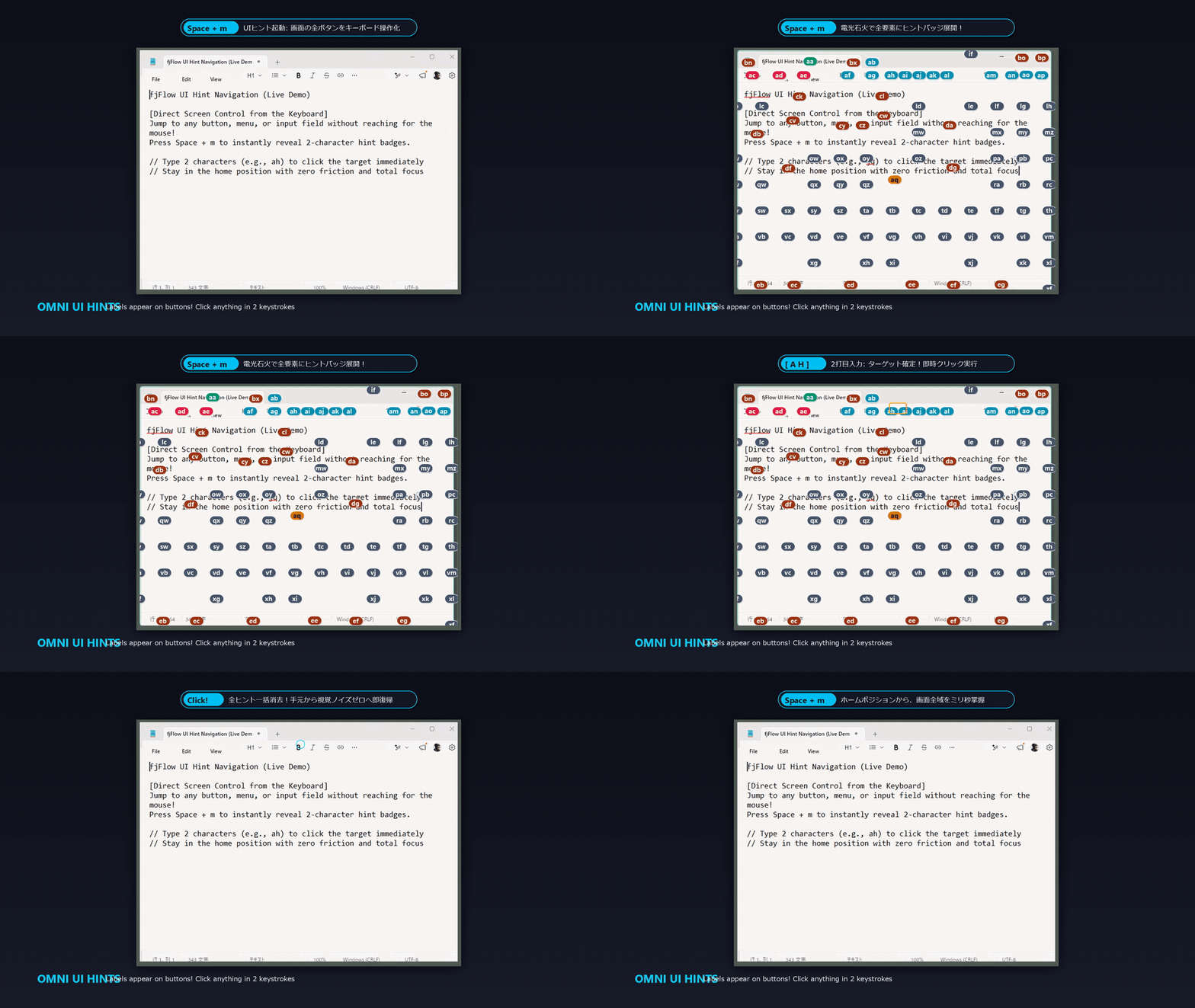
UI Hint Navigation (UI Hints)
Overlay 2-character hint badges on every button, link, and input field with Space+m. Jump and click in just 2 keystrokes without touching your mouse.
Step-by-Step Learning Path
1. Setup & Getting Started
Install FJ Flow and explore initial tray and indicator settings.
Read Guide →2. Master Home Row Typing
Learn Space Shift navigation (hjkl) and Enter/Delete shortcuts.
Read Guide →3. Mouse-Free & Customization
Use UI Hints and adjust JSON configurations or presets.
Read Guide →Explore by Category
Complete technical documentation, categorized for your immediate workflow needs.
Getting Started
5 articlesConcept & Vision
→Official concept explainer and design philosophy of fjFlow.
Design Philosophy
→本ドキュメントでは、FJ Flow に標準搭載されているデフォルトのキー拡張機能(L1, L2, Space Shift)のキーマッピング定義について、「なぜこの配置なのか」「なぜ入力効率が爆発的に上...
Getting Started
→[!NOTE]
User Guide
→fjFlow is an input assistance tool that visualizes your text cursor (caret) position, allowing you to check the Japanese...
FAQ
→Common questions, answers, and technical specifications regarding caret tracking and utility states.
Key Extension
6 articlesKey Extension Manual
→Master all home-row typing layers, Space Shift navigation, combos, and hold-to-symbol mappings without moving your hands.
Key Extension Specs
→The Key Extension feature transforms your keyboard into a multi-layered input system, allowing you to perform navigation...
Space Shift
→Space Shift (SS) utilizes the Space key as a modifier to trigger navigation, editing, and layout layers without moving y...
QuickDraft (Drafting & Cell Entry)
→Decouple text composition from input commitment in environments where Enter commits operations (Spreadsheets, Chat).
Repeat Key
→The Repeat Key feature registers a series of recent keystrokes (typed text or editing keys like Backspace and Enter) and...
Instant Macro
→The Instant Macro feature allows you to record your keystrokes on the fly and play them back instantly via custom key ex...
Mouse & UI Navigation
4 articlesUI HintsFeatured
→UI ヒントナビゲーションは、画面上の操作可能なUI要素(ボタン、リンク、テキストボックス等)にアルファベットの「ヒントバッジ」をオーバーレイ表示し、2文字のタイピングだけでマウスポインタを正確に移動...
Mouse Circle
→Zero friction guide to never losing your mouse pointer on high-resolution and ultra-wide displays.
Space Mouse
→スペースマウス(Space Mouse)は、キーボードの Space キーを押しながらマウスを動かすだけで、上下左右への高速・高精度なスクロール(Space Scroll)や、ウィンドウ全体の自由なド...
UI Snap & Windows
→Complete guide to UI Smart Snap (Aim Assist) for automatic mouse pointer snapping to nearby buttons and inputs, and Window Alignment Snap for keyboard-driven window positioning.
Visual & Feedback
4 articlesCaret Indicator
→The IME Indicator displays your active typing mode (IME On/Off) right next to your text cursor (caret), helping you main...
Focus Highlight
→Four notepad windows are open side-by-side. Even though the text caret is in the bottom-left window, it is almost impossible to identify the active window instantly.
Highlight
→Active Line Highlight emphasizes the line of text you are currently editing while applying a dark, semi-transparent mask...
Zoom
→The Caret Zoom feature magnifies the screen area surrounding your text cursor and displays it as a horizontal banner at ...
Configuration & Presets
4 articlesSettings Guide
→A comprehensive guide covering all 9 tabs of the fjFlow settings interface, detailing every parameter, visual preview, and practical adjustment step.
Settings GUI
→FJ Flow provides a graphical settings screen allowing you to customize the layout, colors, borders, and shortcuts in rea...
Presets
→FJ Flow features a preset system that allows you to instantly apply optimal settings configurations with a single click.
Configuration (JSON)
→In the Pro Edition (fjFlow.ahk), all settings are saved as structured JSON files. You can edit these files directly with...
Architecture & Specs
3 articlesKey Extension Architecture
→Technical architecture documentation covering the deterministic 4-State FSM engine, scaling timers, suppression-first snippet model, and atomic output pipelines in fjFlow.
Caret Position Technical Guide
→This document explains the caret tracking technologies implemented in fjFlow. It details how the utility tracks user inp...
Developer Documentation
→Development guidelines and compilation instructions for contributors and maintainers of FJ Flow.