Instant Macro
The Instant Macro feature allows you to record your keystrokes on the fly and play them back instantly via custom key ex...
Instant Macro
The Instant Macro feature allows you to record your keystrokes on the fly and play them back instantly via custom key extensions.
Operations
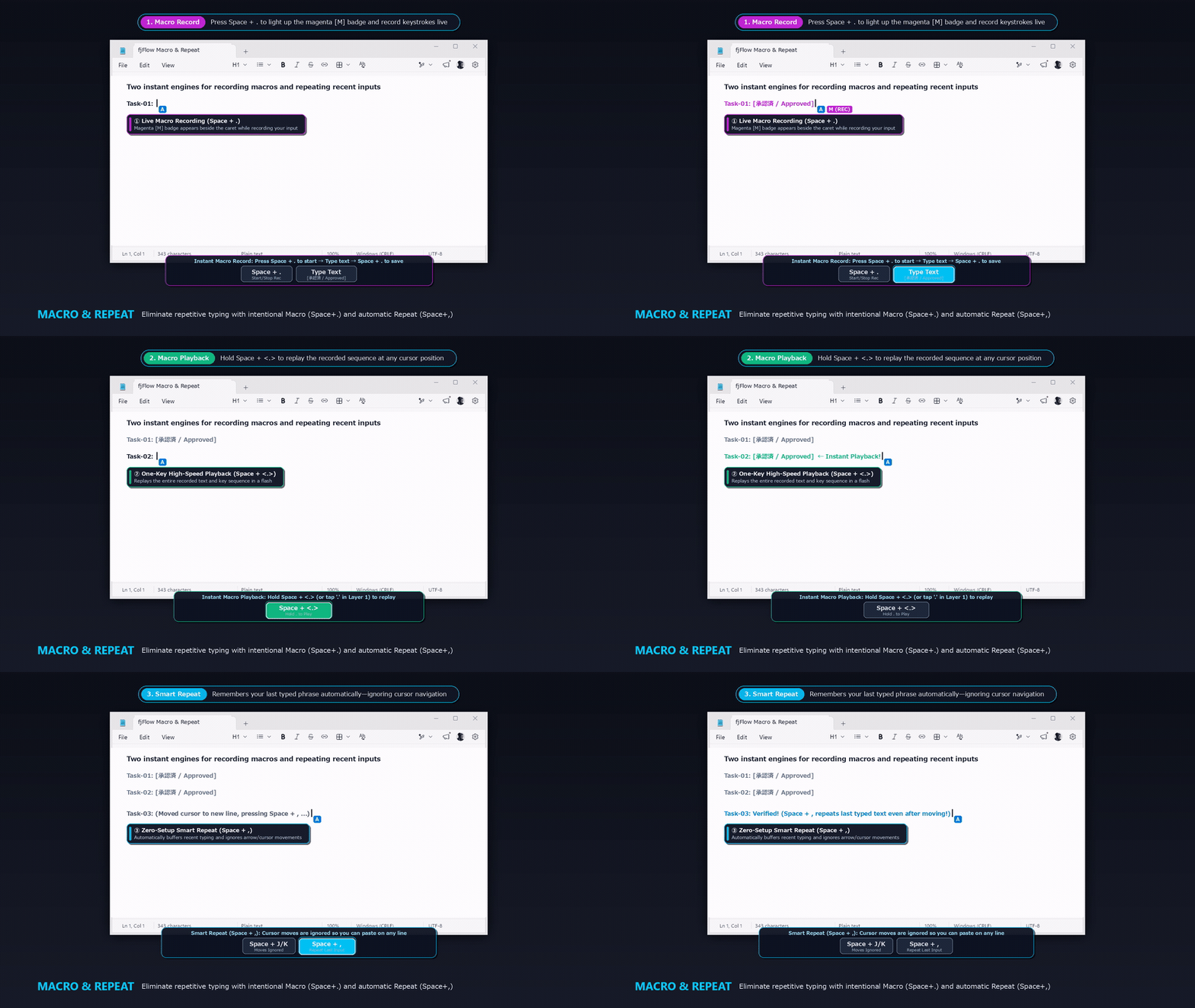 Figure: Live workflow showing
 Space + . macro recording (magenta M badge) ➔ Space + <.> instant playback, and Space + , smart repeat across cursor moves.
You can record and play back macros using two specific commands mapped in your key extensions (in the default layout, Space + . toggles recording, and Space + . Hold or L1 . plays back the macro):
{Macro}(Toggle Recording):- Default mapping: Space Shift (SS) +
.(Period) key - Triggers macro recording when the status is
idle. It clears the previous macro buffer and starts recording your typing. - While recording, the character
"M"(colored magenta:FF00FF) is appended to your caret indicator. - Calling the
{Macro}command again stops recording and saves the buffer. The indicator returns to normal.
- Default mapping: Space Shift (SS) +
{ExecuteMacro}(Playback):- Default mapping: Space Shift (SS) +
.(Period) Hold (<.>), or L1 +.key - Plays back the recorded keystrokes instantly at the caret position.
- Default mapping: Space Shift (SS) +
Accuracy & Anti-Conflict Mechanisms
FJ Flow uses several advanced techniques to prevent desynchronization, layout mismatches, or modifier conflicts during playback:
1. OnChar Hook-Based Capturing
Instead of recording raw physical keystrokes (which can be affected by physical layout timings or IME states), the utility uses the Win32 OnChar API hook to capture resolved characters. This ensures the macro records exactly what appeared on your screen.
2. Double-Key Filtering
To prevent key stutters or double-triggering from hardware issues, it ignores duplicate key captures sent within 150ms.
3. Text Mode Playback
During playback, single-character values are sent using SendEvent("{Text}" key). This bypasses active IME states and modifier overlaps, preventing layout corruption.
4. Smart Space Shift Suppression
If you play back a macro while physically holding down the Space key (for Space Shift), the utility automatically releases the logical Space key state, inputs the macro characters, and then restores the physical Space down state. This prevents space characters from being injected into your macro text.
5. Hook Suspension & Cooldown Guards
- Temporary Suspension: The utility suspends the modifier lock hook (
LockInputHook) during playback, preventing simulated keystrokes from triggering secondary hotkey locks. - Double Output Prevention: Uses sending guards (
IsSendingKey) and cooldown delays (LastSendTime) to block the utility from capturing its own simulated inputs.